Audit Music Ad Links After Changing Distributors

- →Preserve a copy of the ad destination, streaming URLs, and campaign report before changing links.
- →Check the recording, version, artist profile, and playback at each destination.
- →Treat Spotify track-linking and a working paid-traffic journey as separate checks.
- →Record the switch time and exclude your own QA traffic from performance conclusions.
Audit the paid journey, not just the release listing
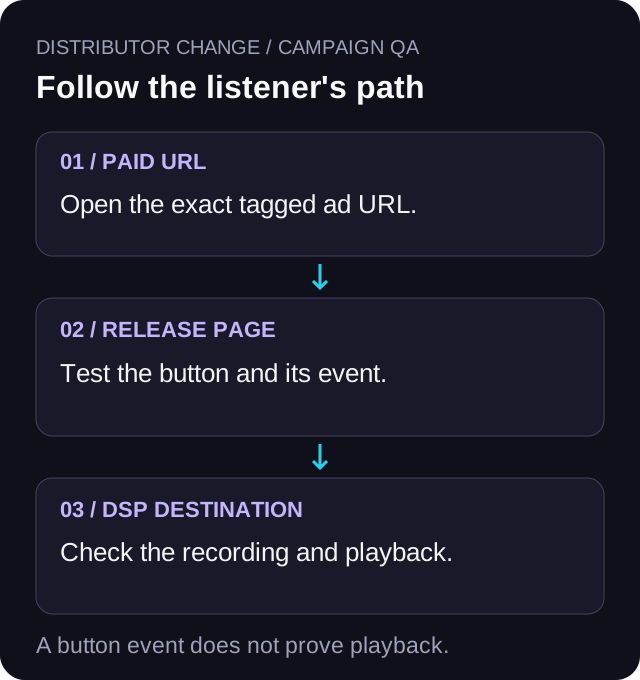
A distributor move can leave you with two release listings to inspect, an old URL in a running ad, and streaming buttons that nobody has tested since the move. The marketing job is to follow the exact path a listener takes. A release appearing in a distributor dashboard is not enough evidence to spend against it.
Separate the distribution handoff from the campaign handoff. Your distributors handle delivery and removal instructions. You own the ad URLs, release landing page, button destinations, and campaign notes. This guide covers that second job. Confirm the delivery and takedown sequence with both distributors rather than treating a marketing checklist as a migration timetable.
Use the same audit for a re-upload made to correct metadata. If the advertised recording, version, or destination changes, you need a new test even when the artwork looks familiar.
Save the before state while it still works
Start with the URL actually used by each active ad. Include any URL parameters. An artist bio, old email, and paid ad can all point to different places, so checking only the link in your profile misses the paid path.
Create one row for each ad-to-platform journey. Record the ad name, landing URL, destination button, old DSP URL, expected artist and recording, and last successful test time with timezone. Add the replacement URL only after you can inspect it. Keep the old value in the sheet instead of overwriting it.
Save the campaign reporting window and current spend before the switch. Preserve page views and DSP click-outs if your landing-page report provides them. Note which conversion event the ad campaign uses. Those records let you describe what changed without guessing from a blended weekly total.
- Ad destination: the full paid URL, including the existing UTM fields.
- Expected content: artist, song title, clean or explicit version, and release.
- Destination state: old URL, candidate replacement URL, and test result.
- Reporting boundary: timestamp, timezone, and person who made the change.
Check track-linking separately from destination health
Spotify says a re-upload can retain its play count through track-linking when the audio and metadata match, including duration, title, and artist name. Its documented check is to open the desktop app, visit the artist profile, and compare the play counts beside the song. If the counts match, Spotify says the tracks have linked.
That is evidence about track-linking. It does not answer whether the URL in your ad opens the intended version for a listener. Keep a separate destination test in your sheet even after the counts match. Do not promise that every historical URL will behave the same way after a move.
DistroKid's switching guidance also calls for matching audio and metadata, including ISRCs, when moving to its service. It explicitly says retention of play counts and playlist placements is not guaranteed. Treat that as guidance for a move to DistroKid, not a universal schedule for every distributor.
Read Spotify's track-linking guidanceCopy the live destination and test the right recording
Get the candidate Spotify link from the release or track itself. Spotify's link instructions use the three-dot menu, Share, then Copy link. Keep track, release, and artist-profile destinations distinct. If the ad promises one song, a profile link is a different journey.
Open the old and candidate URLs. Confirm the artist profile, song title, version, and duration. Play enough of the recording to identify the intended audio where your account and location allow it. A page loading successfully only proves that a page loaded; a wrong artist or clean version can still look technically healthy.
Repeat for every DSP button you offer. Test the paid journey on a phone, including the app or in-app browser your audience will use. If an important market cannot be tested, mark it unverified and keep that limitation visible. Do not use one person's successful playback as proof of worldwide availability.
If a destination fails, hold spend to that journey until it is repaired and retested. Route people to another DSP only when the ad promise and the listener's choice remain clear. Quietly sending a Spotify-labelled button somewhere else makes the audit harder and breaks the fan's expectation.
Read Spotify's link-copying instructionsTest the button event and the handoff as separate results
In VLVTN's public tracking code, a DSP-button action records a dsp_click event with the destination platform. That is a click-out measurement. It cannot establish that the replacement recording played or that a fan saved it. Check the destination independently even when your click-out counter moves.
After a link edit, test the public page rather than relying only on an editor preview. Confirm that the button opens the expected destination and that the appropriate tracking report records the action. If your campaign uses browser and server conversion delivery, use the existing tracking-test guide to inspect that configuration. A distributor change is no reason to change the event definition just to make the report look healthier.
Keep QA traffic identifiable. Write down how many test visits and button actions you made and when you made them. Do not repeatedly click a live ad to generate tests. Use an ad preview or the recorded destination URL where possible, and avoid treating your own tests as acquired listeners.
A worked handoff with a clear stop decision
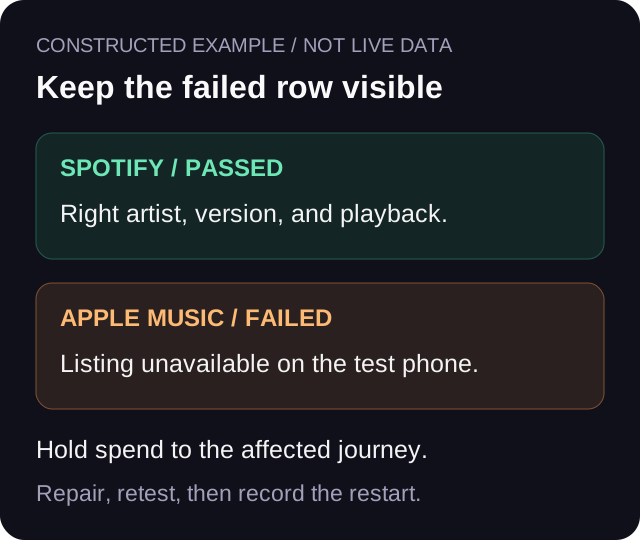
Here is a constructed example, not campaign evidence. An artist has one paid landing page with Spotify and Apple Music buttons. Before the move, the artist records both destination URLs and exports the campaign report through Sunday night. The new delivery is visible on Monday morning.
The Spotify candidate opens the right artist and recording. The Apple Music button still leads to an unavailable listing on the test phone. The artist records Spotify as passed for that tested environment and Apple Music as failed. Spend to the affected journey stays paused while the Apple destination is corrected. No stream or retention claim is made from those tests.
At 10:30 America/Vancouver time, both public-page buttons pass a fresh test on the recorded devices. The artist logs the destination edits, test actions, and restart time. Tuesday's report separates the earlier data from the period after the change. Other markets remain unverified until tested. That is a useful operational result even before there is enough new traffic to evaluate performance.
Keep the switch visible in the campaign report
Compare equivalent reporting windows where possible and label any change in destination. If you moved from a track to an album, changed the release artwork, and restarted the ad at the same time, the before-and-after result cannot isolate the effect of the distributor move.
For an arithmetic example, $24 spent for 80 recorded DSP click-outs is $0.30 per click-out. If that window also contains your own QA actions, disclose them and use a reporting filter only if it can actually identify those actions. Do not silently subtract a guessed number or label the resulting ratio cost per stream.
Start with destination failures, then tracking continuity, then the cost per click-out. Evaluate downstream listener activity separately. A cheaper recorded click-out after the move does not prove the transfer improved listening or revenue.
Use the existing pixel and CAPI test guideUse one sign-off sheet before restarting spend
The downloadable CSV is a blank audit template. Use one row per ad, streaming destination, and test environment. It has fields for the expected version, old and new URLs, playback result, tracking observation, timezone, and the spend decision. Keep access limited to the people who need the campaign details.
A row is ready for sign-off when the paid landing URL resolves, the intended button opens the right recording, playback has been checked in the stated environment, and the observed event matches the campaign's defined action. Assign a person to any unresolved row. Recheck the journey after the old delivery is removed because that is a new destination state.
This sheet is a campaign QA record. It does not authorize a takedown or guarantee preserved playlists, play counts, or historical links. Keep the distributors' delivery instructions alongside it.
Download the distributor-change link audit CSVPrimary sources checked on October 19, 2026
Spotify's re-upload and link-copying documentation supports the platform mechanics above. DistroKid's switching documentation supports its own matching requirements and retention limitation. The audit sequence, stop decisions, and reporting boundaries are editorial recommendations. The worked example and cost calculation are hypothetical, not results from Bradley's campaigns.
Read DistroKid's distributor-switch guidanceReview cost after the journey passes
Once the destination and tracking checks pass, compare cost per recorded DSP click-out over a clearly labelled reporting window. Keep the downstream listening report separate.
Review cost per click-out→Frequently asked
Will my old Spotify link keep working after changing distributors?
Do not assume it. Spotify documents track-linking and how to check matching play counts, but that is a separate check from the URL used by your ads. Test the exact old and replacement destinations before spending and again after the old delivery is removed.
Should I change the URL in every ad during a distributor move?
Change only destinations that need changing after testing. First save the original ad URL and every DSP-button URL. If your paid landing page remains the intended destination, you may only need to repair a streaming button. Verify the whole public journey afterward.
Does a recorded DSP click-out prove the replacement track played?
No. It records the action on the streaming button. Verify playback separately in the environments you can test, and label any untested market or device as unverified.
How should I report campaign results across the switch?
Record the destination-change timestamp and timezone, preserve the earlier reporting window, and label your QA traffic. Separate the periods when possible and disclose other changes. Do not infer that a distributor move caused a performance change from a before-and-after ratio.
Bradley J Simons founded VLVTN and runs his own paid Meta and Spotify ad campaigns as the artist Babbage. He writes about paid music marketing from the buyer's seat, with his own money on the line.
Keep reading
The five utm parameters in plain terms, what each one labels, and how to build a tagged link without breaking it.
A pre-spend tracking check for music smartlinks: browser event, server event, click-out trigger, and dedup.
A practical way to read Meta conversions beside Spotify for Artists without forcing the numbers to match.