Compare Music Ad Click-Out Costs Across Currencies

- →Write USD, CAD, EUR, or another currency code beside every spend and cost figure.
- →Record the rate direction and date so another person can reproduce the conversion.
- →Convert spend first, then divide by the same defined result.
- →Keep bank charges, taxes, and other costs separate unless the comparison explicitly includes them.
Start with the currency code, not the dollar sign
An artist sends you a report showing $0.40 per click-out. A label sends another showing $0.50. Before calling either campaign cheaper, ask which currency each account uses. A dollar sign by itself is insufficient when the reports could be in USD, CAD, or another dollar currency.
Keep the original export intact. In a separate comparison sheet, record the account or campaign ID, spend amount, currency code, report dates, time zone, and exact result definition. If the currency is missing, mark the row incomplete and ask for it. Guessing from the artist's country is a poor substitute for checking the report.
This guide compares the cost of tracked DSP click-outs from paid music campaigns. It does not convert click-outs into streams or royalty revenue. If one export counts outbound ad clicks and another counts a streaming-button click, resolve that mismatch before doing any exchange-rate arithmetic.
Choose the reporting currency and rate basis once
Pick one currency for the comparison, such as CAD for a Canadian release budget. Write down the rate source, rate date or period, and whether each figure means reporting-currency units per one source-currency unit. Apply the same declared method to the rows you intend to compare.
The Bank of Canada publishes daily average rates as one unit of a foreign currency converted into Canadian dollars. Its guidance says those are indicative rates derived from averages of aggregated price quotes. That makes them a documented reference for a CAD reporting method; it does not make them the rate your card provider charged.
If your report is meant to explain actual cash paid, use the relevant billing records and keep any fees visible. If it is a campaign-performance comparison using a reference rate, label it that way. Do not mix a card settlement amount for one campaign with a reference-rate spend conversion for another and leave the difference unexplained.
A date range can require several rate observations. You could convert each day's spend using its documented rate and sum the converted amounts, or declare a consistent period-rate policy for the comparison. Record the choice. If your selected daily rate is unavailable, note the fallback source or leave the row pending instead of inventing a rate.
Read the Bank of Canada's rate direction and reference-rate limitsConvert spend first and keep the denominator fixed
When the rate is reporting-currency units per one source-currency unit, multiply source spend by that rate. Divide the converted spend by the comparable tracked DSP click-outs. For example, USD spend multiplied by CAD per USD gives CAD spend. Reversing the rate without changing multiplication to division produces the wrong unit.
If the source and reporting currency are already the same, the conversion factor is one. Keep that row in the same worksheet so the cost definition stays visible. Use the original unrounded values for calculation and round only the final display. Repeated rounding can create small reconciliation differences.
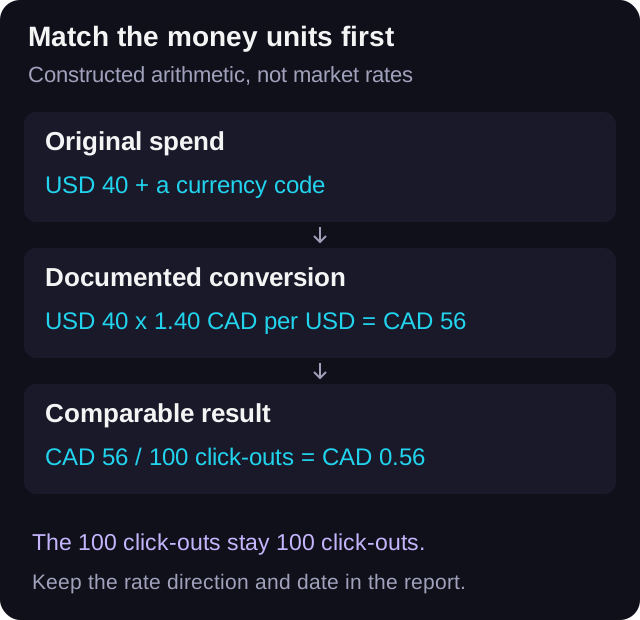
Keep the result count separate from money conversion. Converting USD to CAD does not change 100 recorded click-outs into 140 click-outs. If there are no recorded click-outs, the cost per click-out is undefined for that row. Show spend and zero results separately; do not display a zero cost.
For an aggregate, add the converted spend and divide by the sum of the comparable result counts. A plain average of campaign-level costs gives each campaign equal weight even when their event volumes differ. Use it only if that is the statistic you intend to report, and label it.
- Converted spend = original spend multiplied by reporting-currency units per source-currency unit.
- Cost per tracked click-out = converted spend divided by tracked click-outs.
- Combined cost = total converted spend divided by total comparable click-outs.
- Zero results: report cost per click-out as unavailable, with the spend retained.
Watch a raw ranking reverse when the units match
Here is a constructed example with an illustrative rate, not a current or historical market quote. Campaign A spends USD 40 and records 100 tracked DSP click-outs. Campaign B spends CAD 50 and records 100 of the same defined click-outs. The raw costs are USD 0.40 and CAD 0.50 per click-out.
Assume, only for this example, that one USD equals CAD 1.40. Campaign A's USD 40 becomes CAD 56. Its normalized cost is CAD 0.56 per click-out. Campaign B remains CAD 0.50. The smaller raw number belonged to the more expensive row once both were expressed in CAD.
Together, the rows total CAD 106 and 200 comparable click-outs, giving CAD 0.53 per click-out. That is a cost summary for these constructed rows. It does not establish that B's creative is better, that its listeners are more valuable, or that moving the budget will reproduce the result.
To see why weighting matters, imagine B instead recorded 50 click-outs at the same CAD 50 spend. Its cost would be CAD 1.00. The combined cost would be CAD 106 divided by 150, about CAD 0.71. Averaging 0.56 and 1.00 gives CAD 0.78, which is a different statistic.
Keep media spend and cash paid as separate views
A campaign export and a card statement answer different questions. One can describe media spend in the account's currency; the other can include settlement effects or charges that belong to the cash payment. Save both when available, and label which one the comparison uses.
For a media-only click-out cost, include the declared media-spend numerator consistently. If you want a broader campaign-cost view, add separate columns for the additional included costs and define how you allocate them. Avoid quietly adding a design invoice or an agency fee to only one row and comparing that figure with another row's media-only cost.
Keep any reconciliation difference visible. A reference-rate calculation need not match a bank charge because the rate basis, date, or included charges may differ. Investigate the records instead of overwriting the exported spend until the totals happen to agree. This worksheet organizes campaign reporting; it is not a tax or financial-statement policy.
Check the currency assumptions in every tool
A currency setting in an analytics product has a defined scope. Google's Analytics currency reference describes currency-valued monetization metrics and how local transaction values can be converted to a property's reporting currency. That does not mean an arbitrary pasted ad-account cost or a spreadsheet column has been converted for you.
Likewise, VLVTN's cost-per-conversion grader uses USD-denominated practitioner bands in its source and displays the supplied number as USD. It has no currency selector or exchange-rate lookup. Convert to USD with your documented method before entering a value there; do not paste a CAD figure and read the displayed label as a completed currency conversion.
Use the grader as a contextual read after checking the event and units. Its bands are not an official platform benchmark or a prediction of listener quality. A currency-correct number still needs its country mix, audience, creative, dates, and sample size beside it.
Keep the normalized cost and any downstream listening observations in separate columns. A tracked click-out measures a click from the smartlink to a service. Neither exchange-rate arithmetic nor a favorable grade verifies playback, a save, a follow, or profit.
Check the scope of Google Analytics currency reportingLeave a row another buyer can reproduce
Download the blank reconciliation sheet and use one row per source campaign and reporting interval. Store the original spend, source currency, reporting currency, rate direction, source, date, converted spend, result definition, result count, and cost scope. Keep the export reference alongside it so the next buyer can trace a number back to its source.
Before sharing the comparison, ask someone to recalculate one converted row and the combined total from the saved inputs. Confirm that all included rows use comparable actions and a declared date window. Mark missing currencies, missing rates, or incompatible events as pending rather than filling the gaps with zeroes.
Only then decide what the cost difference warrants. It might justify another controlled creative test or a closer look at the destination. It does not, by itself, justify moving the entire release budget between accounts whose audiences and delivery conditions differ.
Download the blank currency reconciliation worksheetCheck a USD click-out cost
First verify the event definition and normalize the cost to USD. The grader offers a practitioner read, not an exchange-rate conversion.
Open the cost-per-conversion grader→Frequently asked
Can I compare USD 0.40 with CAD 0.50 per music-ad conversion?
Convert both into the same reporting currency using a documented rate basis first. Also confirm that both counts describe the same action in comparable reporting windows.
Should I change the number of conversions when converting currencies?
No. Convert the spend numerator. The count of comparable tracked DSP click-outs stays the same.
Does changing a GA4 reporting currency convert my ad spreadsheet?
No. Google's documentation describes Analytics currency metrics and transaction values. An external ad export or manually pasted cost still needs its own currency check.
Does the VLVTN cost-per-conversion grader convert CAD to USD?
No. The grader uses USD bands and displays the supplied value as USD. Normalize a non-USD cost yourself with a documented rate before using it.
Bradley J Simons founded VLVTN and runs his own paid Meta and Spotify ad campaigns as the artist Babbage. He writes about paid music marketing from the buyer's seat, with his own money on the line.
Keep reading
A buyer-side way to choose country targets for Spotify campaigns without letting cheap conversions distort the read.
A practical way to size a Spotify conversion campaign before spending real money on Meta ads.
How to read link clicks, outbound clicks, landing-page views, and DSP click-outs in one campaign report.
How to use GA4, UTMs, the pixel, and CAPI without mixing up analytics reporting and ad optimization.