Track Concert QR Traffic Separately From Music Ads

- →A QR code and a paid ad can open the same page while carrying different campaign tags.
- →Tag each placement before creating its QR code, then test the exact printed version.
- →A tagged visit identifies the URL used. Shared links and repeat visits limit what it says about people.
- →Keep paid spend divided by paid results. Add print costs separately when evaluating the show placement.
Separate the routes before anything goes to print
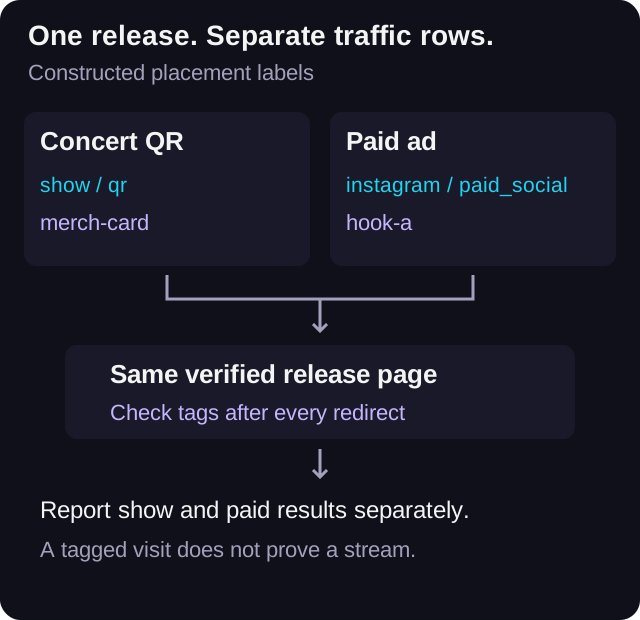
You run release ads all week, then put a QR code on the merch table at a show. Both open the same song page. If both use the same untagged URL, the destination alone cannot tell you which visit came from the show and which came from an ad. Decide how you will separate them before exporting the poster.
Use one stable release page if that is the right listening destination. Give the printed placement its own tagged URL and keep your paid ad URL separate. You do not need a different recording for each route. You do need to preserve the labels through the complete redirect path and check that the reporting system receives them.
Google's URL-builder documentation says campaign parameters on referral and ad URLs can identify the campaigns sending traffic to Analytics. That is the mechanism this guide uses. It does not establish that every QR scanner loads the page, that every visit is recorded, or that every analytics screen exposes the same detail.
Give each printed placement a small naming contract
Start with source, medium, and campaign. Add content when you want to distinguish two physical placements. Google defines source as the referrer, medium as the marketing medium, campaign as the campaign label, and content as a way to distinguish creatives. Treat the values below as a constructed convention you can adapt.
For a fictional Harbour Lights release, a merch-table card could use utm_source=show, utm_medium=qr, utm_campaign=harbour-lights, and utm_content=vancouver-merch-card. A poster beside the exit could use the same first three values with utm_content=vancouver-exit-poster. A paid Instagram ad would retain its own source and paid medium, such as instagram and paid_social.
Keep the spelling and case consistent. Use the placement register to store the exact final URL, not just a note saying show link. A QR graphic file can be renamed after export without changing the URL it contains. The register is what connects the file, physical placement, and report label.
A custom medium such as qr is your reporting label. Do not assume it will appear in a default channel called QR or automatically join an existing channel. Google's default-channel rules say Unassigned is used when no channel rule matches. Check source and medium directly, and define any custom channel grouping deliberately if you need one.
Read Google's campaign URL parameter definitionsBuild the tagged URL first, then make the code
Open the UTM link builder with the actual release page as the base URL. Fill the agreed values and copy the completed URL. VLVTN's builder constructs HTTP or HTTPS URLs with source, medium, campaign, content, and term parameters. It does not generate a QR image or establish a connection to your analytics account.
Use the QR tool you have chosen to encode the completed URL. If that tool inserts a redirect, follow it and check the final landing URL. Keep a copy of the encoded URL and the provider's redirect destination in the register. Do not assume a short URL preserves query parameters until you test it.
Put a readable destination or short fallback link beside the code so a listener has another route if scanning fails. Decide whether that fallback needs a separate placement label. If the printed fallback omits the campaign tags, record that its visits may not appear under the QR row.
Before paying for a print run, give the artwork and its destination to one person for approval. If you change the URL after approval, generate and test the code again. Editing a spreadsheet cell does not change an already printed QR code. Whether a provider lets you edit a redirect depends on that provider; this guide makes no such product promise.
Test the final printed journey, not just the design file
Print a proof at the size you intend to use. Scan it with a phone from the distance and lighting the placement will allow. Try more than one device when you can. A successful scan from a bright laptop screen says little about a small card under the merch-table lamp.
Check the page title, recording, and streaming buttons. Inspect the landing URL after any redirect and confirm the agreed tags survive. Then verify the visit in the reporting system you actually use. If you need a placement-level DSP click-out report, test that breakdown explicitly before promising it in the post-show report.
In GA4, use campaign dimensions to inspect the tags. Google's documentation warns that UTM parameters are omitted from Landing page + query string and Page path + query string dimensions; Page location is a different dimension. A missing tag in one path table is not sufficient evidence that the redirect stripped it.
Record your test time and mark test visits or click-outs in the worksheet so they can be excluded where your reporting supports it. If the reporting setup cannot isolate the tests or break results down by placement, say so. Do not turn a site-wide click-out total into a placement result just because the tagged page loaded.
- Scan the physical proof and open the intended release.
- Check the final URL after redirects.
- Verify the source, medium, campaign, and placement value in the relevant report.
- Test a streaming button and confirm whatever click-out breakdown you plan to use.
- Save the test device, time, result, and approval owner.
Name the action you actually measured
There are several steps between seeing a poster and listening to a song: noticing it, scanning, opening the page, choosing a service, and playing the recording. Your available data may cover only some of those steps. Call the first measured action a tagged visit or session if that is what the report contains. Use scan only when your QR provider actually measures and defines scans.
A person can open the same code twice. A friend can forward the decoded link. Someone can photograph the poster and open it later. Those are reasons to describe the result as traffic through that placement's URL rather than a verified count of attendees who became fans.
Keep the DSP click-out definition explicit. It measures a recorded click from the page to a streaming destination. It does not prove that a song played, that a listener saved it, or that the person attended the show. A physical QR placement also does not turn the subsequent web interaction into a box-office sale or an offline conversion record.
VLVTN's web analytics source reads the five UTM parameters from the current page URL, and its collector stores those fields. That code supports campaign-tag collection where that collector is running. It does not prove a particular account has every required event, report, or placement-level breakdown. Check your actual destination and report before relying on them.
Keep website click-outs separate from offline event recordsKeep the paid cost calculation in its own row
Here is a constructed arithmetic example, not a campaign benchmark. Suppose paid ads spend $48 and produce 80 tracked paid DSP click-outs in the same reporting window. Their cost per tracked click-out is $48 divided by 80, or $0.60.
Suppose the show placement also produces 25 click-outs that your reporting has actually isolated to that tagged route. Dividing the $48 ad spend by all 105 click-outs gives about $0.46. That lower number answers a different question because the denominator includes results from the show placement. Keep $0.60 as the paid-only calculation.
For the show row, suppose printing cost $30. Dividing that cost by the 25 isolated click-outs gives $1.20 in print cost per tracked click-out. It leaves out design, staff time, and other costs. State that boundary rather than calling the QR traffic free or presenting the figure as a complete acquisition cost.
If you can isolate only tagged visits, report the visits. Leave placement-level click-outs unavailable and do not calculate a click-out cost for that row. Missing detail is a reporting limit, not a zero-result campaign. Likewise, neither the hypothetical $0.60 nor $1.20 predicts what your next show or ad will produce.
Keep the printed link useful after the show
A poster can stay up, and a card can stay in a pocket. Decide what the printed route should do after the event. A stable release page may remain useful; a page promising an expired show needs attention. Recheck the destination when you replace a recording link or change the page.
Review results at a fixed cutoff with the event date and report time zone written down. Keep a later check separate so delayed openings do not silently change the first report. The placement label describes the route people used; it should not be treated as proof that every later visit happened at the venue.
Download the blank register below. Use one row per printed placement or paid comparison route. Fill in the exact tagged URL, code asset, test evidence, report cutoff, and measured action. Keep unknown values blank with an explanation. The register is a manual handoff tool, not an automated scanner or analytics integration.
Download the blank concert QR placement registerBuild the placement URL before printing
Use consistent campaign tags and test the final destination from the printed code.
Open the UTM link builder→Frequently asked
Can concert QR codes and paid ads use the same smartlink?
Yes, if the page is the right destination for both. Give each incoming route distinct tags and verify they survive redirects. Confirm the reporting breakdown before promising separate results.
Does a QR visit count as a paid ad conversion?
Keep your reports separate. A tagged QR visit is not evidence that a paid ad caused it. Ad platforms apply their own attribution rules; the tags do not override those rules.
Why can my custom QR medium appear as Unassigned in GA4?
GA4 uses channel rules, and Google's guidance says Unassigned applies when no rule matches. Inspect source and medium directly rather than assuming a QR channel exists.
Does a QR scan prove someone attended my concert or streamed my song?
No. Codes can be shared and revisited. A recorded landing-page visit or DSP click-out covers that action only; it does not establish venue attendance or playback.
Bradley J Simons founded VLVTN and runs his own paid Meta and Spotify ad campaigns as the artist Babbage. He writes about paid music marketing from the buyer's seat, with his own money on the line.
Keep reading
A simple naming system for source, medium, campaign, and content on music ad links.
How to choose the right Meta event path when your music campaign sends traffic to a smartlink.
How to use GA4, UTMs, the pixel, and CAPI without mixing up analytics reporting and ad optimization.
A buyer-side way to choose country targets for Spotify campaigns without letting cheap conversions distort the read.