Clean vs Explicit Versions: Where Should Music Ads Send Listeners?

- →Match the actual audio in the ad to the recording at the destination.
- →Spotify can block playback of tracks tagged explicit when a listener disables explicit content.
- →Offer a clean alternative only when you have verified that recording and its link.
- →Separate creative-version labels, destination-version labels, and downstream listening in your report.
Choose the recording before choosing the URL
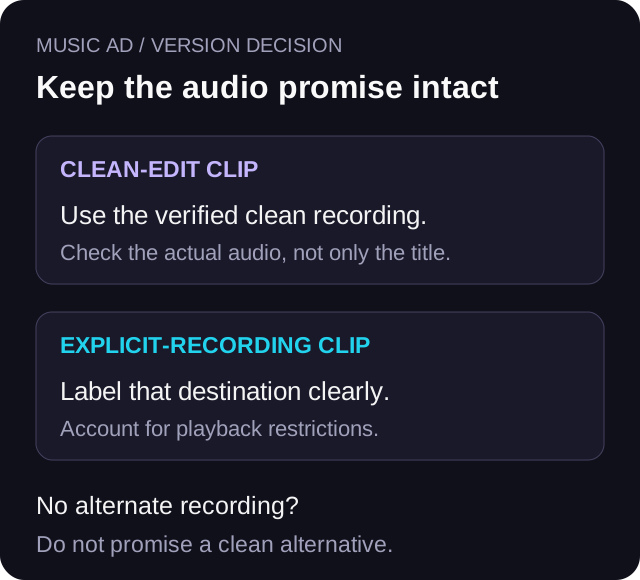
Start with the part of the song people hear in the ad. If it is a clean edit, that is the recording they expect when they tap through. If the explicit version is the intended release, make that destination clear. The title and artwork alone may look identical across versions, so listen to the destination audio before signing off.
There is no universal evidence here that a clean version converts better or that an explicit version attracts better fans. Make the first decision from the ad's promise, your available recordings, and the listeners you intend to reach. Treat any later performance comparison as a separate test.
Use this rule for radio edits, too: write down what changed in the audio instead of assuming the word clean means the same edit everywhere. A shorter intro and a changed lyric can both affect what a listener hears. This guide covers the destination decision; the existing creative-testing guide covers broader hook and format experiments.
Account for explicit-content filters before blaming the ad
Spotify's current support page says that when explicit content is disabled, tracks with an explicit tag are greyed out, cannot be played, and are skipped. It also says the tag depends on information from rights-holders. That creates a real handoff limit: an ad and landing page can work while the selected recording is unavailable under the listener's playback settings.
Spotify explains how to look for versions without explicit tags, while warning that some releases have no clean version. Do not promise an alternative until you have found the intended recording. Avoid telling fans to turn off a setting as the default solution; respect the playback choice and offer an accurate alternative when one exists.
Apple Music also supports content restrictions. Apple's web-player guide documents rating controls, and its Windows guide includes a control for allowing explicit music. Those sources support checking the chosen player, not assuming all devices have identical menus or restrictions. A working Spotify test says nothing about the Apple Music journey.
Read Spotify's explicit-content and clean-version guidanceUse a small decision rule instead of a guessed winner
If both recordings are available and the ad clearly features one version, use that version's destination as your starting point. A clean clip can have its own tagged landing URL, with the actual clean recording behind each streaming button. An explicit clip can have a separately labelled destination if that is the version you are promoting.
If you only have the explicit release, say what it is. Do not call the destination clean because the ad excerpt happens to contain no profanity. If you only have a clean version, describe that version accurately. The listener should not need to discover a mismatch after leaving the ad.
Use separate landing pages or clearly labelled destination choices only when your link setup supports them and someone can maintain the mapping. Otherwise, keep one accurate destination and one explicit decision in the campaign notes. Two poorly maintained pages add another failure point. Do not imply that a smart link detects a listener's content settings or manufactures an alternate recording.
- Two versions and a version-specific clip: match the recording and label the path.
- One version available: describe it honestly; do not invent an alternative.
- Unknown destination audio or playback state: verify it before sending paid traffic.
- No capacity to maintain separate paths: keep one clear, accurate journey.
Keep a version manifest beside the campaign brief
Give each ad-to-recording path one row. Record the clip filename, the version heard in the clip, the exact destination for each service, and the version heard at that destination. Use the actual track link rather than a search page when the promise is one recording.
Keep the clean and explicit destinations distinguishable in the sheet even if their cover art matches. Save who checked the audio, when they checked it, and which player and account settings were used. A version label without that listening check is an unresolved row.
VLVTN's button component opens its supplied URL and reports the selected DSP through the tracking callback. The click-tracking code records a dsp_click action. Those mechanics do not establish which audio played after the handoff or reveal the listener's explicit-content settings. Your manifest supplies the version context that the button event alone cannot provide.
Download the version-destination manifest CSVTest the handoff without changing a listener's preferences
Use your own test account and device. Open the exact tagged landing URL, choose the streaming button, check the artist and version, and listen at a point where the edits differ. Record the observed result. When permitted on your own account, a separate check with an explicit-content restriction can show the limit described by the platform.
If you change your own test setting, record its original state and restore it afterward. Never use a fan's account, ask for their credentials, or treat changing parental controls as part of acquiring a listener. If you cannot test a particular player or setting, mark that cell unverified.
Keep a clean alternative visible only when its link has passed the same audio check. If the page offers two choices, use labels that identify the actual versions. Do not send a clean-labelled choice to the explicit track as a fallback. That makes a technically working redirect a failed promise.
Read Apple's web-player content-restriction guideA constructed example with one resolved path
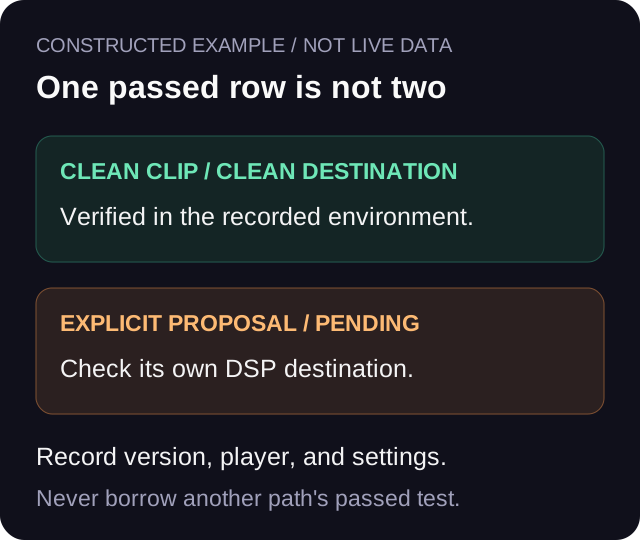
Imagine two edits of a fictional song called Signal. The ad asset signal_clean_15s.mp4 uses the clean chorus. The initial campaign sheet contains the explicit track URL because someone copied the first search result. Nobody has spent money yet. The correction is to find the actual clean recording, verify its audio, and replace the mapping before launch.
The second row is a proposed explicit-version ad. Its destination has not been checked in Apple Music. That row stays pending rather than borrowing the clean row's passed test. A passed Spotify check belongs to that Spotify path and tested environment only.
This example establishes a release decision, not a performance result. It does not claim that one version gets more streams, that a content filter caused an observed loss, or that VLVTN ran the campaign.
Keep the version test separate from the tracking definition
Use a stable naming convention that identifies both the ad and destination version. For example, a lowercase utm_content value such as cleanclip_cleandest_v1 can distinguish one path from explicitclip_explicitdest_v1. These are suggested labels, not platform standards. Do not put personal information in URL parameters.
Keep source, medium, and campaign definitions consistent so the paths remain readable. Confirm what your reporting tool actually retains before relying on those fields. UTM labels organise inbound traffic; they do not certify the recording played, record a fan's content-filter choice, or turn the DSP click-out into a stream.
If you change both the ad audio and the destination, you are comparing two complete journeys. You cannot isolate the effect of the destination alone. If you only change the destination, the clip may no longer represent one of the recordings accurately. Decide which question matters before spending, document the tradeoff, and avoid describing the result as a controlled causal finding when it is not.
Use the existing music-ad UTM naming guideStop for a mismatch, then evaluate performance separately
Hold a path when its button opens the wrong recording, its version is unknown, or the label promises an alternative that does not exist. Correct and retest that path before interpreting its cost per click-out. A cheaper click to the wrong recording is not a usable result.
After the paths are accurate, read ad spend and recorded DSP click-outs in a defined window. Keep downstream listening separate and disclose your QA actions. There is no universal clean-versus-explicit conversion benchmark in the sources reviewed here. Your report should say what you observed and what the measurement cannot explain.
For a distributor transfer, use the separate distributor-change audit as well. That guide owns the before-and-after URL and removal checks. This manifest owns the mapping between the promoted audio version and the intended destination.
Use the distributor-change audit when a release is movingPrimary sources checked on October 20, 2026
Spotify's explicit-content support page supplies the filter behavior, rights-holder tag provenance, and limits of finding clean versions. Apple's current web-player and Windows guides document their own restriction controls. The version manifest, campaign decision rules, suggested URL labels, and fictional Signal example are editorial methods rather than platform performance claims.
Read Apple's Windows restriction settingsLabel the version path before you launch
Build consistent tagged URLs for the version-specific journeys you can actually maintain. Keep the recording manifest beside the tags, then check the public destination before spending.
Build a tagged campaign URL→Frequently asked
Should every music ad point to the clean version?
No universal rule or performance advantage is established here. Match the destination to the recording the ad represents, make the choice clear, and account for playback restrictions. Offer a clean alternative only when that recording and link have been verified.
Can Spotify block an explicit track after someone clicks my ad?
Spotify says tracks tagged explicit cannot be played when explicit content is disabled. A successful ad click or landing-page button action therefore does not prove the selected track can play under that listener's settings.
Does a clean ad clip mean the linked song is a clean recording?
No. A clip can avoid an explicit lyric while pointing to a different full recording. Verify the actual destination audio and label that version accurately.
Can my smart link detect a listener’s explicit-content setting?
The VLVTN code reviewed here opens the configured DSP URL and records the button action. It does not establish a listener's explicit-content preferences or attest to playback. Do not promise automatic version selection.
Bradley J Simons founded VLVTN and runs his own paid Meta and Spotify ad campaigns as the artist Babbage. He writes about paid music marketing from the buyer's seat, with his own money on the line.
Keep reading
A simple naming system for source, medium, campaign, and content on music ad links.
A practical creative-testing order for music ads before a campaign gets more spend.
A destination and reporting audit for paid campaigns when a release moves between distributors.