Keep Your QA Clicks Separate From Music Ad Results

- →A working test event can still contaminate the performance report you read later.
- →Use a QA register with timestamps, time zones, exact URLs, and observed event evidence.
- →Validate GA4 internal-traffic rules in Testing before considering permanent exclusion.
- →Subtract only QA results you can identify in the same metric and reporting window.
Separate the event check from the performance read
You open your release page on three phones, tap Spotify a few times, and send the link to a collaborator for approval. Those checks help you catch a broken destination. They can also add activity to the reports you plan to use for the launch decision. A small campaign is especially easy to misread when a handful of tests sits inside its result count.
Keep two questions separate: does the journey work, and what did paid traffic produce? The existing pixel and CAPI test guide covers the first question. This guide covers the evidence you need to stop your own checks from becoming an unexplained part of the second answer.
Do not assume every system treats a test the same way. List the reports you will read: site analytics, smartlink events, and the ad platform's attributed result. Confirm the observed behavior in each. A test being visible in one report is not proof it was included in another.
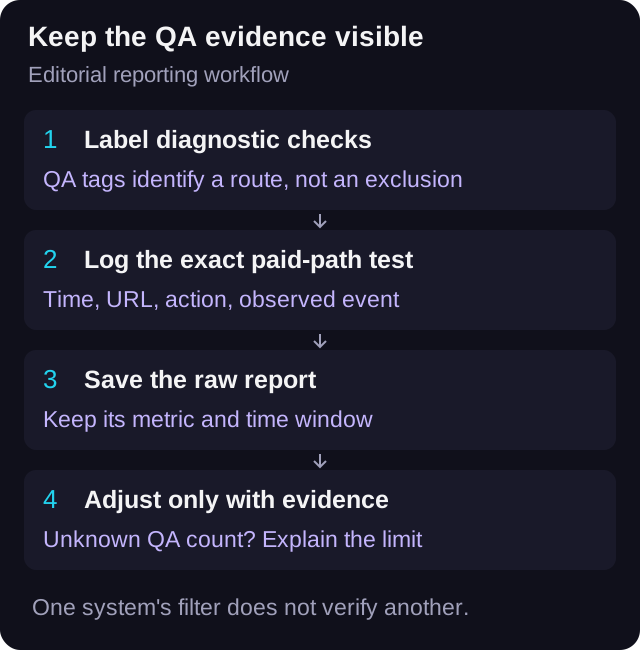
Use a diagnostic label you can recognize later
For routine checks, create a clearly labelled URL before you open it. In a constructed example, utm_source=qa, utm_medium=test, utm_campaign=harbour-lights-qa, and utm_content=phone-check identify the purpose. Use a convention the whole team understands and keep those values out of the live ad's URL fields.
Google's URL-builder guidance describes UTM fields as campaign labels sent to Analytics. That supports identifying the diagnostic route. It does not turn a value such as test into an exclusion instruction. Inspect the campaign dimensions in the reporting system that receives those labels rather than expecting an automatic hidden bucket.
VLVTN's UTM builder constructs a tagged HTTP or HTTPS URL. Its web analytics source reads the five UTM fields and the collector stores them. The builder does not configure a GA4 data filter or promise that a tagged click-out will be removed from an ad report. Treat tag creation and report exclusion as separate tasks.
A diagnostic URL also differs from the exact production URL. If a redirect or parameter is part of the final paid journey, test that final journey too. Give the production-URL check a timestamp and event record in the QA register, since its campaign labels may look like real paid traffic.
Read Google's campaign URL parameter guidanceLog actions and observed events separately
Use one row per test sequence. Record the person, device, URL, start and end times with time zone, intended service, and the report being inspected. Write down the action you performed and what actually appeared. A button tap and a received event are different pieces of evidence.
If the same action has browser and server copies, do not count the copies as two human tests. Follow the existing event-ID check and record the relevant identifiers when you can safely retain them. Keep access tokens and personal information out of the worksheet and URL.
A useful note says phone check at 09:10 Pacific, one Spotify tap, one matched result visible in the named report. A note saying tested a few times is not enough to support subtracting four conversions later. If a report cannot expose the required evidence, record that limitation and retain its raw count.
Set a review cutoff before reading performance. Save the export date and report time zone alongside the test window. Tests made after the cutoff belong to a later check, so they should not silently change the explanation of an earlier screenshot.
Test a GA4 exclusion before making it permanent
Google documents an internal-traffic method for web activity based on IP matching. The rule marks matching events with a traffic_type value, and a data filter determines what happens to those events. A rule for one network does not establish that a collaborator's separate network matches it. Verify the actual coverage before relying on it.
Use the documented Testing state to inspect matches through the Test data filter name dimension. Google says a filter may take 24 to 36 hours to apply. Allow for that delay rather than declaring the rule broken immediately or activating a broader rule without checking it.
Active exclusion changes incoming processing permanently. Google's warning says excluded data will not be available later in Analytics or BigQuery. That makes Testing and a documented review important. For a report-only view, Google's guidance points to report filters as an alternative to permanently removing data.
Keep the scope clear. A GA4 filter is a GA4 processing rule. It does not establish that the same actions were excluded from VLVTN's own analytics collector or from an ad-platform event path. Check those systems separately. This guide does not require changing your live analytics settings to finish a release-link test.
Check Google's internal-traffic filter states and data-loss warningReconcile only the metric you can verify
Preserve the original report, then create a separate adjusted view if the evidence supports it. Use the same result definition, time window, and time zone in both. A test page view cannot be subtracted from a DSP click-out count. A test visible in site analytics cannot automatically be subtracted from the ad platform's attributed conversions.
Here is constructed arithmetic, not an observed campaign. Suppose the relevant report contains 24 tracked DSP click-outs and your register identifies four of those exact counted results as QA. The supported non-QA remainder is 20. With USD 12 of media spend, the raw ratio is USD 0.50 per click-out; the adjusted ratio is USD 0.60.
That adjusted ratio describes the named report and the four verified exclusions. It does not prove the remaining 20 results were all caused by paid ads, unique people, or streams. Establish the traffic scope independently before labelling it paid-only performance.
If you know someone tested the link but cannot identify which results were counted, show the raw report with a QA limitation. Do not subtract an estimate simply to produce a clean-looking number. If all counted results are verified QA, the remaining count is zero and the adjusted cost per result is undefined, not zero.
Finish the QA handoff before the campaign read
Before launch, confirm that the ad still contains the intended production URL, not the diagnostic URL. Recheck any streaming destination changed during QA. Have the person reading performance acknowledge the test window and any report-specific limitations.
Keep planned QA bounded. One intentional test sequence with recorded evidence is easier to reconcile than repeated taps while refreshing several dashboards. If an event does not appear, follow the tracking diagnostic workflow instead of creating an unknown number of additional events.
After launch, log later checks under a new window. A link fix, distributor change, or new version can require fresh QA, and the same reporting discipline still applies. Keep those checks visible so the campaign's measurement history explains what changed.
Use the existing event and deduplication test checklistKeep a small register beside the report
Download the blank register and use one row per test sequence and reporting system. If the same test is checked in two systems, use separate rows with a shared test reference. This lets you show that a result was observed in one system while its status in another remains unknown.
The sheet includes room for the diagnostic or production URL, observed metric, event evidence, raw count, verified QA count, adjusted count, spend scope, and reviewer. Leave unsupported adjustments blank. It is a manual record, not an automated filter, deletion tool, or analytics connection.
Download the blank music-ad QA registerBuild a clearly labelled diagnostic URL
Keep its labels distinct from production, and log the final check of the actual paid URL separately.
Open the UTM link builder→Frequently asked
Does adding utm_source=qa automatically exclude a music-link visit?
No. A campaign tag labels the URL. You must verify how the receiving report handles it; the tag is not a universal exclusion command.
Should I subtract every link test from Ads Manager conversions?
No. Subtract only results you can establish were included in the exact metric and window you are adjusting. A site event alone does not prove an attributed ad conversion.
Can I recover events excluded by an active GA4 data filter?
Google says excluded data is never processed and is unavailable in Analytics or BigQuery. Validate the rule in Testing and consider report-only filtering when permanent exclusion is unnecessary.
Does a verified QA click-out prove my song played?
No. It verifies the observed button action or event path. Playback at the streaming service requires a separate check, and the event does not prove a save or follow.
Bradley J Simons founded VLVTN and runs his own paid Meta and Spotify ad campaigns as the artist Babbage. He writes about paid music marketing from the buyer's seat, with his own money on the line.
Keep reading
A pre-spend tracking check for music smartlinks: browser event, server event, click-out trigger, and dedup.
How to use GA4, UTMs, the pixel, and CAPI without mixing up analytics reporting and ad optimization.
A simple naming system for source, medium, campaign, and content on music ad links.
A destination and reporting audit for paid campaigns when a release moves between distributors.