Release Delayed? What to Do With Your Music Ads

- →Confirm whether the release is delayed or the displayed date reflects a time-zone difference.
- →Pause the affected ads and scheduled spend increases, then verify their delivery state.
- →An interim destination needs its own honest promise and separate reporting.
- →A new date alone does not pass the restart gate. Test playback and tracking first.
Confirm what changed before rebuilding the campaign
A distributor email says the release has moved. Your ads still say out Friday. Start by listing what you know: the old date, the proposed new date, the affected services, and the countries you intended to advertise in. Assign one person to get the answer from the distributor. An estimate from a group chat is not enough to schedule another launch.
Spotify's Upcoming tab shows unreleased music delivered by a label or distributor. Its support page says release details include the date, tracklist, and cover art, and changes to those details require an update from the label or distributor. A smartlink edit cannot change the release date at the streaming service.
Spotify also explains that the date displayed in Upcoming is the earliest date the release becomes available in any country. The displayed date can differ from the date you set because of time zones. Ask the distributor to confirm both the date and the release-time convention before treating a one-day difference as a failed delivery.
Write the time zone beside every restart instruction. If the date is still unconfirmed, write unconfirmed. Do not replace an uncertain Friday with a confident Monday just to keep the ad calendar moving.
Read Spotify's guidance on unreleased music and release datesContain the affected spend and preserve the cutoff
Pause the ads whose promise is now wrong. Review the campaign's current delivery state, future start times, end times, and planned budget increases. If several people manage the account, name the person responsible for checking those controls. Leaving a second scheduled ad set behind can undo the pause.
Record when you requested the pause and when you checked the resulting delivery state. Save the ad IDs, destination URLs, spend, and tracked DSP click-outs for the interrupted window. Check again for later spend or reported results before closing the account of that period. This is an audit recommendation, not a promise about how quickly an ad platform stops delivery or finalizes reporting.
Keep the original records. If a broken release journey attracted clicks, those clicks still cost money. Removing them from the campaign history makes the restart look better than the full campaign actually performed.
- Check active ads and scheduled ads using the old release claim.
- Review temporary budget increases tied to the old date.
- Record the account time zone and reporting cutoff.
- Save the current URL and creative before changing either.
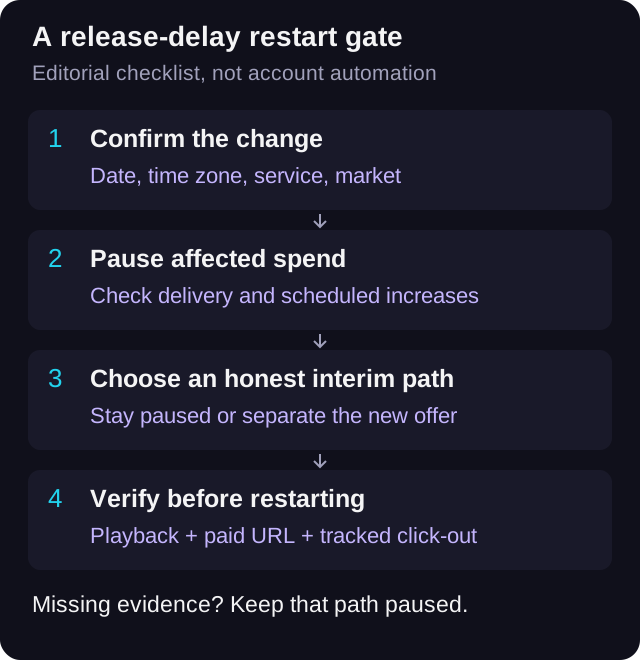
Choose an interim path you can explain honestly
You have three practical choices: stay paused, promote an already available recording in a separate campaign, or run a separate update message with an accurate destination. Staying paused is a useful decision when the new release has no verified listening destination. You do not owe the calendar another paid campaign.
If you promote a catalogue track, make the ad about that track. Check the audio, title, artwork, and destination together. Do not leave a new-single ad running and silently swap its button to an older song. The listener tapped for a particular recording, and the report should describe what the campaign actually offered.
If you use an update page, tell people what is confirmed and what is still pending. Give them a meaningful next action that the page actually supports. Do not label an unavailable release Listen now. This workflow does not depend on a VLVTN pre-save feature or promise that the page will turn a visitor into a later listener.
An interim page visit, an old-song click-out, and a new-release click-out are different results. Record them separately. Even if all three appear in one ad account, pooling them hides whether the release journey ever worked.
Give the restart a reporting boundary
Keep a short phase label in your worksheet: interrupted, interim, or restart. Save the exact destination URL used in each phase. For tagged links, keep a stable campaign name and a distinct creative or phase label you can recognize later. Google's URL-builder guidance defines utm_campaign for the campaign and utm_content for distinguishing creatives, and says parameter values are case-sensitive.
For a constructed example, a release named Harbour Lights could use utm_source=instagram, utm_medium=paid_social, utm_campaign=harbour_lights, and utm_content=restart_hook_a. An interim ad for an older track should have a name that identifies that track instead of borrowing the delayed single's result label. These are example naming choices, not a requirement from Google or VLVTN.
Use the UTM builder to create the URL, then open that exact tagged URL on a phone. Tags help you describe inbound traffic. They do not prove a stream, save, or follow, and they do not make a pre-pause versus post-restart comparison a controlled experiment. The date, availability, and creative may all have changed.
Check Google's campaign URL parameter guidanceRequire playback and tracking evidence before restarting
Get the confirmed release details first. Then open the intended recording at each streaming destination you advertise and check that it plays in the market you plan to buy. A URI in Spotify for Artists or a working landing page does not establish that the recording is playable for the intended listener. Record the service, country, device, time, and what you tested. Mark untested markets as untested.
Open the actual ad destination inside the mobile journey you expect fans to use. Check the artwork and title, tap the advertised service, and verify the recording. Then check the tracked DSP click-out using your normal test workflow. The music being live and the event arriving are separate checks; neither substitutes for the other.
VLVTN's release-link editor supports editing the page and streaming destinations. Recheck the published page after saving. Do not assume that updating one destination updates every service or that the application will pause an ad account when a service is unavailable.
Restart only the ads whose claims and destinations you have verified. If one service or market is still unavailable, keep the affected path paused or narrow the campaign to a verified path whose creative matches. Recheck scheduled spend increases before allowing them to run against the new date.
- Distributor confirmation includes date, time, and time zone.
- The advertised recording plays on the selected service in the intended market.
- Creative and page claims match the currently available recording.
- The exact paid URL works on mobile and the DSP click-out is recorded.
- One named person approves the restart and checks the spend schedule.
Work through an interruption without inventing a result
Here is a constructed planning example. Harbour Lights was scheduled for Friday. On Thursday the distributor reports a delay, with no confirmed replacement date. The buyer pauses the new-single ads, records the account cutoff, and removes the planned Friday budget increase. The worksheet says new date unconfirmed and restart blocked.
The artist still wants to promote an older single that is already available. The buyer prepares a separate ad featuring that recording and uses a separate campaign label. Its DSP click-outs belong to the older single. They are not evidence that the delayed release has recovered.
When the distributor later confirms a new date, the buyer checks the actual release on the intended services and devices, verifies the paid URL, and tests the click-out. Only the paths that pass are cleared to restart. This example supplies decision steps, not a performance benchmark or a claim that a particular delay length is safe.
After restarting, review the release campaign's spend and tracked click-outs within the restart window. Also retain the interrupted spend when reviewing the full release budget. If you compare phases, state what changed. A cheaper click-out after the delay could reflect a different creative, market, or audience rather than the pause itself.
Use one sheet to keep the restart decision visible
Download the blank worksheet and use one row per ad and destination path. Duplicate rows when different services or markets need separate decisions. Fill in the old promise, confirmed new date, pause request, delivery check, and the person responsible. Leave missing evidence blank and mark the restart blocked until it is checked.
The sheet also gives you space for the tested service, country, device, playback result, tracking result, and final sign-off time. Keep platform receipts and screenshots beside it. The worksheet organizes a human decision; it cannot inspect your account, change delivery, or certify worldwide release availability.
Download the blank release-delay restart worksheetBuild and test the exact restart URL
Use consistent campaign tags, then check the complete paid journey before restoring spend.
Open the UTM link builder→Frequently asked
Should I keep music ads running if the release is delayed?
Pause ads promising a recording listeners cannot play. An interim campaign can make sense when its creative and destination offer something accurate and available, with its own reporting boundary.
Can I change a Spotify release date in my smartlink?
No. Spotify directs release-detail changes through the label or distributor. Editing a smartlink only changes the page or destination you control.
Does a release appearing in Upcoming mean it is ready for paid listening ads?
No. Upcoming shows delivered unreleased music. Verify playback at the advertised destination in the intended market before restarting a listening campaign.
Should I combine results from before and after the delay?
Keep the complete spend record, but report the interrupted and restart phases separately. Note changes to creative, destinations, dates, and markets. A tracked DSP click-out remains a click-out, not a verified stream.
Bradley J Simons founded VLVTN and runs his own paid Meta and Spotify ad campaigns as the artist Babbage. He writes about paid music marketing from the buyer's seat, with his own money on the line.
Keep reading
How to use scheduled budget increases around release moments without losing the conversion read.
A pre-spend tracking check for music smartlinks: browser event, server event, click-out trigger, and dedup.
A destination and reporting audit for paid campaigns when a release moves between distributors.
Choose a version-specific ad destination, account for playback restrictions, and keep the test honest.