Archive Music Ad Evidence Before an Access Handoff

- →A dashboard link and a saved export serve different jobs.
- →An export needs its report settings and extraction time to remain interpretable.
- →Preserve the actual ad-to-recording path and the creative version alongside the results.
- →Verify that the recipient can open and explain the archive before the agreed access change.
Agree on the evidence package before the access date
A release campaign is ending, a buyer is changing, or an agency engagement is closing. The incoming person needs more than a screenshot showing a cheap result. They need to know what action was measured, which recording the ad offered, and which settings produced the report.
Write down the archive owner, intended recipient, reporting cutoff, and agreed access-change date. List the systems that hold relevant evidence and what the current operator is authorized to export. If an item is unavailable, name the gap while the current owner can still investigate it.
Keep evidence preservation separate from account administration. A downloaded report does not establish rights to transfer an ad account, domain, dataset, audience, or recording asset. Use the relevant owner's approved access workflow for those changes. This guide covers the readable campaign record that should survive the handoff.
Save both the report file and the settings behind it
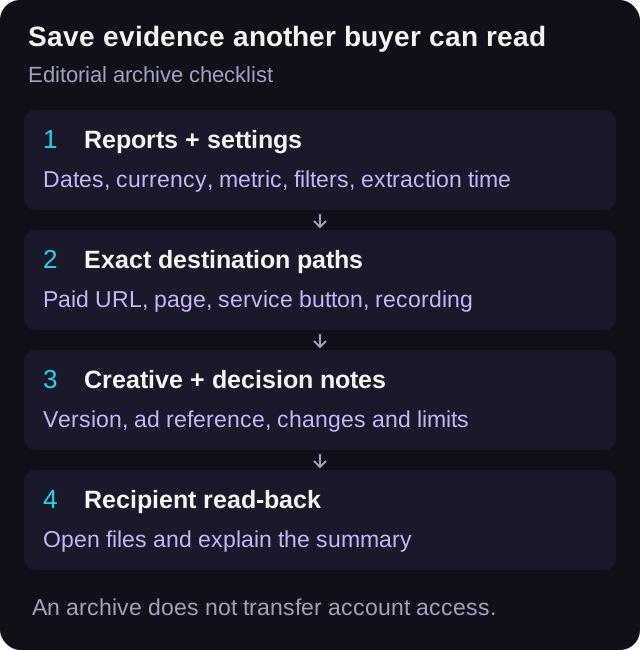
For each campaign export, record the platform, account or property identifier, date range, time zone, currency, chosen result, attribution setting where relevant, filters, breakdowns, and extraction time. Keep the original export intact and put any analysis in a separate file.
A screenshot can explain the visible view, but a structured export helps the next buyer inspect rows and totals. Use both when they add different evidence. A live dashboard link is useful for navigation while access remains available; it is not a substitute for the file you intend to retain.
Google's GA4 documentation lists report exports to PDF, CSV, and Google Sheets, and requires at least the Viewer role at the property level for sharing or exporting. It also describes a row limit for CSV and Sheets exports. Check the resulting file's coverage rather than calling every downloaded report a complete backup.
Keep the source report name and a short note describing how it was produced. If the available view is filtered to one country or device, say so in the manifest. Do not rename that file all-campaign-results and leave the filter undocumented.
Read Google's report export formats, role requirement, and limitsArchive listening evidence as its own report
If the campaign review includes Spotify listening data, save the relevant authorized exports separately from ad and smartlink reports. Spotify's web documentation says some Spotify for Artists statistics can be downloaded as CSV, including song streams, Audience timeline statistics, and Songs and Playlists tables.
Record the selected dates and the meaning of each table you save. A file of song streams describes listening reported by Spotify. A smartlink export of DSP click-outs describes a different action. Putting both in the same folder does not make the counts interchangeable or establish that the ads caused every stream.
If the selected report cannot be exported with your current permissions or available view, record that limitation. Do not replace a missing platform file with an estimated stream total and present it as observed data. An honest gap is easier for the incoming buyer to handle than an unexplained number.
Check which Spotify for Artists statistics support CSV exportPreserve the exact listening journey that ran
Save the full destination URL from the ad, including its campaign parameters, then record the landing page and the actual streaming-button destinations. Include the expected artist, release, recording version, and last verified test time. A release title alone may not distinguish a clean edit from an explicit recording or an old listing from a replacement.
Keep before and after values for destination changes made during the campaign. If the ad moved from a playlist to a single, retain the change timestamp and the creative that accompanied each route. The incoming buyer should not have to infer that history from today's landing page.
VLVTN's UTM builder constructs a tagged URL from the supplied values. It can help document a naming convention, but it cannot recover an earlier URL you did not save or migrate an account. Preserve the URL actually used rather than rebuilding a plausible-looking substitute after the handoff.
Record measurement conditions that affect interpretation, including known collection gaps and changes to consent handling. Current VLVTN source gates its web analytics initialization on accepted consent. That supports noting consent-dependent collection; it does not establish what any earlier campaign collected or authorize bypassing the current check.
Keep the creative version and decision notes with the results
Store the authorized final creative file or its agreed asset reference, plus the ad identifier, copy, destination, and version label. A filename such as final-video.mp4 is insufficient when several edits ran. Keep a record that connects each result row to the creative and destination it actually used.
Add short decision notes: what changed, when it changed, what the buyer observed, and what remained uncertain. Include verified tracking incidents, QA windows, and destination changes that materially affect the report. Link to those records instead of hiding them in an informal chat history.
Keep the package limited to the evidence the recipient needs and is authorized to receive. Report settings and campaign references belong in the manifest; access tokens, passwords, and unnecessary listener-level identifiers do not. The archive should help the next buyer interpret the campaign without becoming a second credential store.
Document a measurement gap without inventing missing resultsMake the recipient read the package back
Before the agreed access change, ask the recipient to open the stored files from the intended archive location. They should be able to identify the campaign, dates, currency, measured action, and destination version, then explain how a summary figure was calculated. This is a practical acceptance check for the evidence package.
Here is a constructed example. A Harbour Lights campaign summary says USD 24 spend and 60 recorded DSP click-outs, giving USD 0.40 per recorded click-out. During read-back, the recipient finds that the attached screenshot shows only a mobile-device breakdown with 42 results. The package needs an explicit scope note and the matching full-view evidence; the two views should not be silently treated as identical.
The reviewer also checks that the saved creative points to the recording named in the destination record. If the package contains only a live dashboard link, an expired asset reference, or an export with missing settings, mark that item incomplete and resolve it while the responsible owner is available.
A successful read-back shows that the package is usable. It does not certify account ownership, complete attribution, or future access to every linked platform. Keep access verification as a separate step under the owner's approved process.
Use a manifest that names coverage and gaps
Download the blank manifest and use one row per retained file or evidence item. Record its role, source, location, reporting window, settings, coverage limit, responsible owner, and read-back status. Keep the exact file reference so a reviewer can find what the row describes.
Use simple statuses such as ready, incomplete, or unavailable, with a reason for the latter two. Leave missing information blank rather than filling it with guessed settings. Keep a final list of unresolved items beside the archive so the next buyer knows where the record stops.
After the handoff, use the preserved campaign record as context for the next test. A tracked DSP click-out remains a click-out, and a historical result remains tied to its original dates and setup. The archive explains the earlier read; it does not promise the same cost, streams, saves, or follows in the next campaign.
Download the blank campaign evidence manifestKeep the campaign URL convention readable
Use the link builder for a documented new URL. Preserve the exact historical URL and its settings separately.
Open the UTM link builder→Frequently asked
Is a dashboard link enough for a music-ad handoff?
Keep it as a navigation reference, but also save the authorized report files and the settings needed to interpret them. Verify that the recipient can open the retained package.
Does exporting a campaign report transfer the ad account?
No. Evidence files and account permissions are separate. Ownership and access changes need the relevant owner and platform process.
Can Spotify stream exports replace missing smartlink click-outs?
No. They measure different actions. Keep listening exports separate and state any missing measurement evidence.
What if the recipient cannot reproduce the summary from the archive?
Check the metric, dates, currency, filters, and breakdowns. Mark the package incomplete until the matching evidence or a clear limitation is recorded.
Bradley J Simons founded VLVTN and runs his own paid Meta and Spotify ad campaigns as the artist Babbage. He writes about paid music marketing from the buyer's seat, with his own money on the line.
Keep reading
How to use GA4, UTMs, the pixel, and CAPI without mixing up analytics reporting and ad optimization.
A practical reconciliation method for artists and labels comparing paid campaigns reported in different currencies.
Build an evidence-based campaign report after tracking fails, without turning unknown results into invented conversions.
A destination and reporting audit for paid campaigns when a release moves between distributors.