Your Song Left the Playlist: What to Do With the Ads

- →A working playlist URL can open a changed tracklist.
- →Distinguish an ad selling one recording from an ad selling the playlist itself.
- →Use a listening destination, not a collaborator invitation, in a public campaign.
- →Record the change window and verify the full paid journey before restarting.
Read the ad promise before changing the URL
Your ad uses the chorus from your new single and points listeners to a playlist. Later, you find the song is missing. The playlist still opens, and the smartlink button still records click-outs. Those checks can pass while the ad no longer delivers the recording it promises.
Start with the actual creative, caption, and landing page. Does the ad ask people to hear your song, or does it offer an ongoing playlist with a particular mood or genre? That distinction determines the response. A song-specific promise needs a verified route to that recording. A playlist campaign needs the live collection to match the advertised playlist offer.
The existing song-versus-playlist guide covers the initial destination choice. This guide covers what happens after that destination changes. Do not use a low click-out cost as a reason to ignore a mismatch that a listener can see.
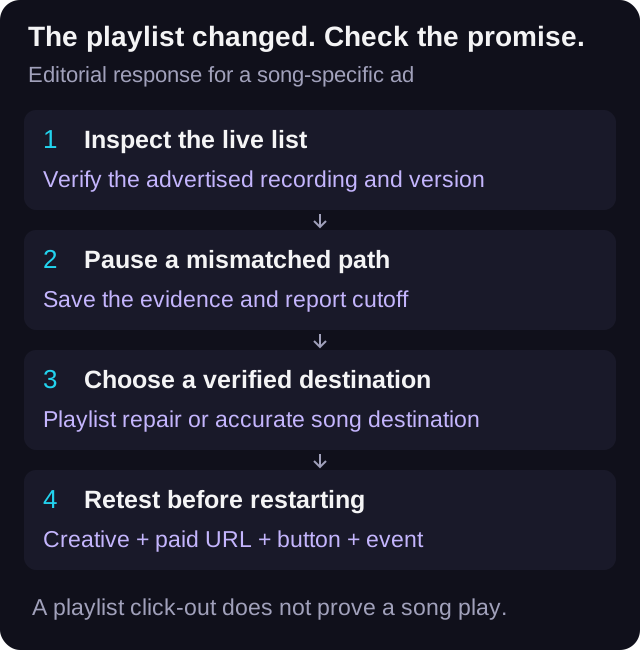
Inspect the current playlist rather than the saved artwork
Open the exact playlist URL used by the campaign. Record its title, visible owner, the advertised recording, and the time of the check with a time zone. Check the actual recording and version in the list instead of relying on the playlist cover or a screenshot from launch day.
Spotify's playlist-editing documentation explains that tracks can be removed and reordered. Its collaborative-playlist guidance also says collaborators can change the included tracks and their order. A campaign pointing to a playlist therefore needs an ongoing content check, not just a one-time URL check.
Separate absence from other failures. The song may be missing from the list, the wrong version may be present, the destination may fail to open, or your test may not establish availability in the intended market. Record the observed condition. Do not diagnose a curator's intent or a platform-wide removal from one failed test.
If the list still includes the song, record where you found it and test the intended journey. List position alone is insufficient evidence for a claim that every visitor will hear that recording first. Keep the ad's wording within what the observed destination actually supports.
Read Spotify's playlist-editing guidanceCheck who controls the list and which link you copied
Name the person responsible for the campaign destination, then separately record who can edit the playlist. Having permission to update a smartlink does not establish permission to change the Spotify tracklist. A curator-owned list can remain outside the buyer's control even when the buyer owns the ad account.
For a collaborative list, agree on who reviews changes that affect paid traffic. Spotify documents collaborator access as allowing additions, removals, and reordering. Keep that access decision with the playlist owner; do not assume every campaign collaborator needs permission to edit the collection.
Inspect the link type too. Spotify's collaborative-playlist page says its collaborator invitation links are valid for seven days. Those invitations serve an access-management purpose. A public music ad should use the intended listening destination, with that journey tested, rather than accidentally publishing an invitation to edit the list.
Do not add someone as a collaborator simply to repair the ad path. First decide whether the playlist remains the right destination at all. If you cannot obtain a verified playlist state, an available recording-specific destination may give the campaign a clearer promise.
Check Spotify's collaborator permissions and invitation-link limitsContain the mismatch and save a reporting boundary
Pause the affected song-specific ads when the promised playlist journey cannot be verified. Check their current delivery state and any scheduled start or spend increase tied to that destination. This is an editorial operating recommendation, not a guarantee about how quickly a platform stops delivery.
Save the ad IDs, full landing URLs, streaming-button destination, spend, and tracked click-outs at a declared reporting cutoff. Record the last known successful playlist check and the first observed mismatch. If you do not know when the tracklist changed, keep that interval unknown.
A screenshot from Tuesday and a failed check on Thursday do not prove every Wednesday click reached the wrong content. They also do not prove Wednesday was clean. Describe the evidence window rather than assigning an exact failure time from a convenient reporting boundary.
Retain the original campaign totals. Later work may produce a verified restart, but it does not erase money spent while the destination was uncertain. Explain the interruption beside the report rather than rewriting old click-outs as missing streams.
Choose a replacement that matches the actual offer
For a song campaign, consider a verified song or release destination if the playlist no longer provides the promised path. Check the recording, version, artist, and availability before using it. If you keep a smartlink, check the destination behind each advertised service button rather than assuming all buttons changed together.
For a playlist-brand campaign, inspect whether the current collection still matches the ad's stated offer. If the creative features a particular recording that is no longer included, revise that creative or choose another destination. Keeping the playlist name the same does not settle the mismatch.
VLVTN's streaming-link editor supports changing a service URL, and its smartlink update route checks edit permission before saving changes. That updates the destination you control. It does not edit a Spotify playlist or establish an automatic monitor that pauses ads when a track is removed.
If the playlist owner restores the track, verify the live result before restarting. Record what changed and who checked it. If restoration is uncertain, keep the affected route paused or use a supported alternative with matching creative. Do not promise a future placement as if it were already available.
Work through a curator change without guessing the outcome
Here is a constructed case. A fictional Harbour Lights single is promoted with a chorus clip and a playlist destination. At launch, the buyer records that the intended version is present. During a later review, the buyer finds that version absent while the page and click-out tracking still work.
The buyer pauses the song-specific ads, saves the current list and report cutoff, and notes that the exact removal time is unknown. The playlist is controlled by a curator, so the buyer does not describe a smartlink edit as a playlist repair. The artist instead approves a recording-specific destination that can be verified.
The buyer checks the new listening path, updates any playlist-specific promise in the creative, and records a new phase in the campaign notes. A full test of the actual paid URL confirms the page, button, recording, and event before the campaign restarts. QA actions are logged separately using the existing QA workflow.
The final report retains the earlier spend and click-outs with the uncertainty note, then shows the restart period separately. This case demonstrates a decision process. It supplies no campaign benchmark, exact removal timestamp, playlist-follow count, or claim that the original click-outs produced streams for the single.
Record the restart checks without hiding QA trafficKeep a destination-change register beside the ad report
Download the blank register and use one row for each paid path under review. Include the ad promise, playlist URL, expected recording, last verified state, first observed mismatch, ownership boundary, decision, replacement, and final test evidence. Keep the before and after values instead of overwriting the original destination.
Set the next review according to the campaign's spend and how much control you have over the list. A check after a known edit or before a planned spend increase can be more useful than a fixed schedule nobody follows. The review is still a manual responsibility unless your actual tooling proves otherwise.
When reporting results, call the measured action a playlist click-out if that is what the destination was. A song being present when you checked does not turn every playlist click-out into a play of that song. Keep downstream listening evidence separate and state its limits.
Download the blank playlist destination-change registerPrepare the verified restart URL
Keep campaign labels consistent and record the destination change before testing the exact paid path.
Open the UTM link builder→Frequently asked
Should I keep song ads running after my track leaves the playlist?
Pause the affected song-specific path while you verify or replace it. A playlist-brand campaign requires a separate check that the current collection still matches its creative and offer.
Does changing a VLVTN service URL restore my track to Spotify?
No. It changes the destination you control on the smartlink. Spotify playlist contents require the relevant playlist permissions.
Can I use a Spotify collaborator invitation as the ad destination?
Use the intended listening journey instead. Spotify describes collaborator invitations as edit-access links that expire after seven days, so they serve a different purpose from a public listening campaign.
Do playlist click-outs prove my advertised song played?
No. The click-out records the handoff to the playlist. It does not prove a specific recording played, a playlist was followed, or the song was saved.
Bradley J Simons founded VLVTN and runs his own paid Meta and Spotify ad campaigns as the artist Babbage. He writes about paid music marketing from the buyer's seat, with his own money on the line.
Keep reading
A practical destination choice guide for artists deciding where paid Spotify traffic should land.
A destination and reporting audit for paid campaigns when a release moves between distributors.
A reporting checklist for your own release-link tests, with a QA register and a checked cost example.
An interruption checklist for paid release campaigns, with a restart gate and a downloadable worksheet.