Compare Music Ad Reports Across Daylight Saving Time

- →The same date label can cover different instants in two reporting systems.
- →A fall-back day can contain 25 elapsed hours in a location that changes clocks.
- →A repeated local hour needs its UTC offset to identify the instant.
- →Do not change an account or property time zone simply to make two report totals agree.
Start with the report boundaries, not the graph shape
The release campaign looks stronger on Sunday: more spend, more visits, and more DSP click-outs. Before calling it a creative win, check how many hours the report covers and which time zone defines that Sunday. A different reporting boundary can move results between date labels without changing the underlying listener action.
Write down the source system, report time zone, selected dates, currency, action definition, and extraction time. Then identify the corresponding start and end instants. Use an interval that includes the start and excludes the next boundary so adjacent exports do not accidentally count the same endpoint twice.
Keep spend and results aligned. A daily spend export from one account clock cannot be divided by click-outs from a different daily clock without checking the overlap. The arithmetic may work while the comparison answers the wrong question.
Check which locations actually change clocks
NIST's current U.S. guidance says daylight saving time in 2026 ends on November 1 at 2 a.m. local time in places that observe it. The local hour repeats when clocks return to 1 a.m. The worked example below uses New York for that U.S. fall-back transition.
Do not assume the same transition applies to your own location or every campaign market. B.C.'s September 17, 2026 notice says no November 1 clock change will be made under its new year-round Pacific Time standard. The notice also preserves existing local mountain-time arrangements in parts of northern and southeastern B.C. Check the specific region and reporting configuration.
For a buyer in Vancouver comparing reports from another jurisdiction, that difference is a reason to verify each clock independently. A laptop display, a report's configured time zone, and the audience's local time are separate pieces of context. A location's current clock rule does not prove that every export or conversion tool has applied it correctly.
Read B.C.'s November 2026 clock-change notice and local exceptionsWork through a 25-hour reporting day
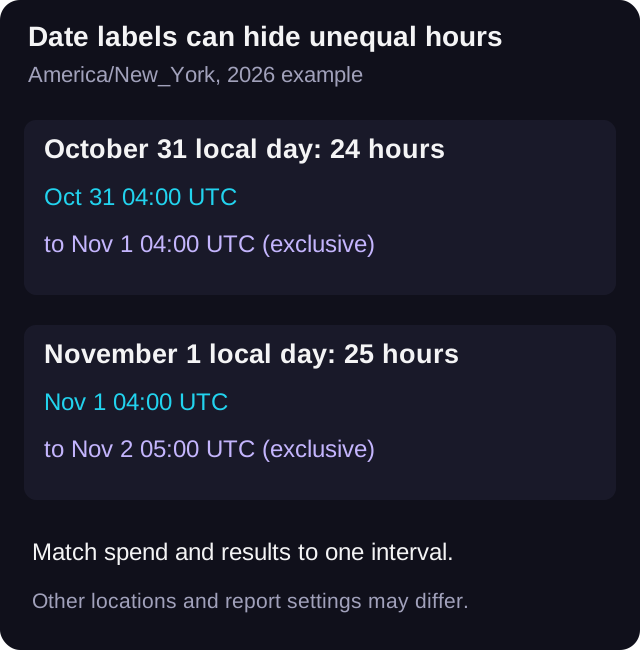
For America/New_York, midnight at the start of November 1, 2026 is 04:00 UTC. Midnight at the start of November 2 is 05:00 UTC. The interval contains 25 elapsed hours. By comparison, October 31 midnight through November 1 midnight runs from 04:00 UTC to 04:00 UTC the next day, or 24 hours.
Keep both local labels and UTC boundaries in the worksheet. A local 01:30 on November 1 occurs twice in this example: 01:30 with a minus-four-hour UTC offset corresponds to 05:30 UTC, while 01:30 with a minus-five-hour offset corresponds to 06:30 UTC. A record that says only 01:30 cannot distinguish those two instants.
These are checked time conversions for the named New York example, not a claim about every region. If your export lacks the offset or other disambiguating evidence, mark the mapping uncertain instead of assigning the repeated hour by guesswork. Use a current, verified time-zone conversion method and cross-check the boundaries against the applicable clock rules.
Inspect the configured reporting clock before changing it
Google's GA4 setup documentation says a property's reporting time zone determines the day on which a visit is recorded. It also says Analytics adjusts for daylight-saving changes when the selected zone observes them. That describes GA4's behavior; it does not establish that an ad export or another analytics system uses the same clock.
The same Google guidance warns that changing an existing property's time zone affects data going forward and can produce a flat area or spike around the change. Do not flip the property setting to make a single comparison line up. First preserve the original settings and reconcile the actual intervals.
For the ad account and smartlink report, inspect the settings and export behavior those systems actually provide. Do not assume that the campaign's target country selects the account's reporting time zone. If a system supplies only daily aggregates, document the limit rather than claiming you have rebuilt a precise hourly boundary from them.
Read Google's reporting-time-zone setup and change warningsSeparate a longer day from a better campaign
Here is constructed campaign arithmetic, not an observed result. Suppose a 24-hour window spends USD 24 and records 48 comparable DSP click-outs. A 25-hour window spends USD 25 and records 50 of the same defined click-outs. Both have a cost of USD 0.50 per recorded click-out.
The second total is larger, but the example has the same spend per elapsed hour and the same recorded click-outs per elapsed hour. That demonstrates why larger daily totals alone do not establish a performance improvement. It is not a forecast that a platform will spend more just because the day is longer.
Use elapsed-hour context where it helps explain the read, then keep the campaign's actual result definition central. Equal hourly rates do not make different audiences, creative, attribution settings, or consent-dependent collection comparable. A cheaper click-out still does not prove a stream, save, or follow.
If you need an equal-duration comparison, choose explicit matching intervals and verify that each source can provide those intervals. State which portions of the local calendar days the comparison includes. Do not silently discard an hour and keep labelling the result the complete day.
Keep scheduling and campaign labels separate from report conversion
A report-boundary check does not change when the ads were intended to run. Keep any release-time or schedule instruction with its named zone and intended instant, then inspect the platform's actual schedule separately. Do not infer a schedule repair from a nicer-looking daily graph.
Keep campaign identifiers and UTM labels stable while investigating the clock difference. VLVTN's UTM builder constructs a tagged URL; it does not set a report time zone, convert event timestamps, or repair ambiguous historical records. A new label cannot move a result into a different UTC interval.
If you perform a fresh destination or tracking check, log it as QA. Preserve the report extraction time and any known collection gaps so a later export can be interpreted. A clock-change explanation should not hide an unrelated tracking failure or substitute one metric for another.
Keep verification traffic separate from the campaign readUse a window worksheet another buyer can reproduce
Download the blank worksheet and use one row for each report interval. Save the source zone, local boundaries, offsets, UTC boundaries, elapsed hours, spend, recorded action, filters, and source file reference. Mark unsupported conversions or missing offsets as uncertain.
Before sharing the comparison, have a reviewer read the start and end instants back and recalculate elapsed hours and cost. Check that spend and results cover the same interval in the same currency. Keep a local-day view and any equal-duration view separately labelled.
The goal is a report whose boundaries are explicit. You can then investigate the creative or destination without a shifted date label deciding the story for you. Keep downstream listening evidence separate from the smartlink click-out read.
Download the blank reporting-window worksheetKeep the campaign URL labels consistent
Use the link builder for documented campaign tags. Reconcile reporting time boundaries separately.
Open the UTM link builder→Frequently asked
Does every November clock-change report cover 25 hours?
No. It depends on the specific location and configured reporting clock. The 25-hour example here is America/New_York on November 1, 2026; B.C. has announced different 2026 arrangements.
Why can the same date show different click-out totals in two systems?
The systems may define the day using different time zones, as well as different measurement or attribution rules. Compare the underlying intervals before treating the difference as missing data.
Should I change my GA4 property time zone to match one ad export?
Inspect and reconcile the intervals first. Google's guidance says a property time-zone change affects forward reporting and can produce an apparent gap or spike around the change.
Can UTM parameters fix a daylight-saving mismatch?
No. They label incoming traffic. They do not set the reporting clock or identify which repeated local hour an ambiguous timestamp represents.
Bradley J Simons founded VLVTN and runs his own paid Meta and Spotify ad campaigns as the artist Babbage. He writes about paid music marketing from the buyer's seat, with his own money on the line.
Keep reading
A practical reconciliation method for artists and labels comparing paid campaigns reported in different currencies.
How to use GA4, UTMs, the pixel, and CAPI without mixing up analytics reporting and ad optimization.
Build an evidence-based campaign report after tracking fails, without turning unknown results into invented conversions.
Build a release-campaign evidence package another buyer can read without guessing the settings behind the numbers.